


For businesses evaluating a third-party tax provider for Stripe Billing, three common setups are below. Stripe Tax and custom builds on Stripe's Tax APIs are other options this article doesn't cover. They look alike on a slide and play out differently once you're running them. Here's what each one does, and what your team ends up owning.
Setup one: Two vendors, and your tax team in the middle
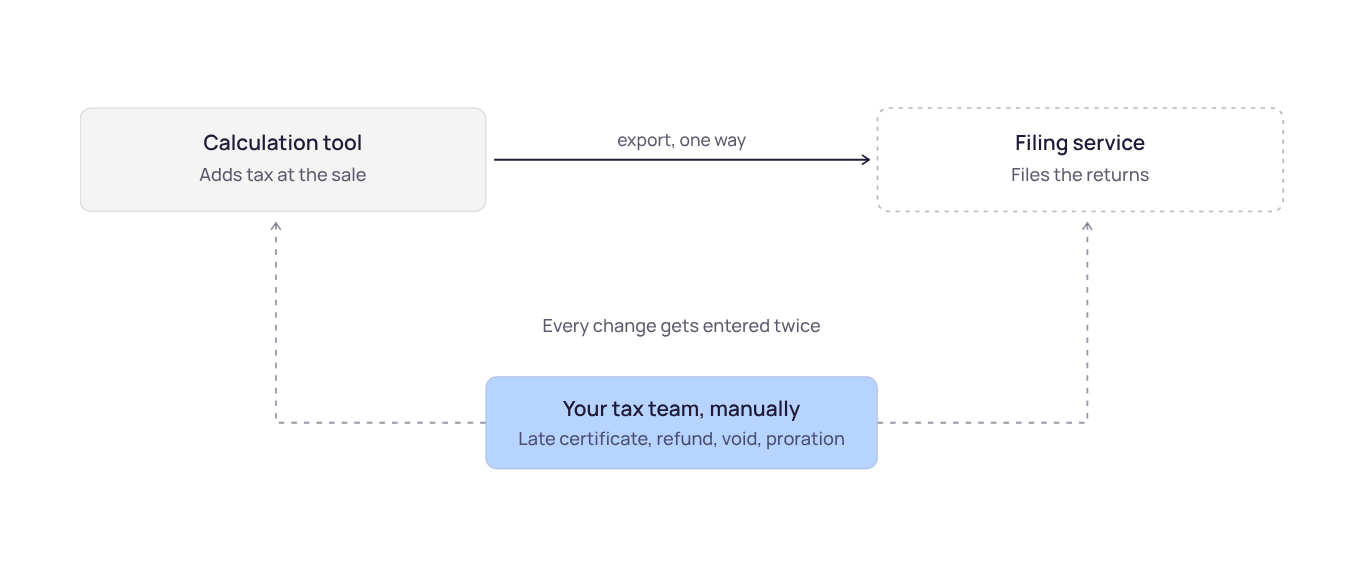
This is how most companies start. You buy a calculation tool because it feels like an engineering problem, then a filing service because that feels like accounting. They get bought years apart, often by different people. Between them sits an export that only runs one direction.
The refund nobody can issue
An exemption certificate shows up three weeks after you invoiced and filed. Your filing service can amend its return. It can't reach into your billing system, so it can't give the customer their money back. Somebody goes and finds the transaction, issues a credit by hand, then asks the filing service to amend separately.
That's the ordinary life of a B2B invoice. Late certificates, late VAT IDs, refunds, voids, failed payments, prorations. All of them land after you've already filed.
Two tools, two answers, same invoice
Because they're separate products, they can disagree from identical inputs. One normalizes an address differently. One maps it to a different jurisdiction. A product category changes in one place and not the other. Every disagreement turns into a reconciliation item, and on a split stack that's usually billable work rather than a settings change.
“Before, we were running two parallel systems. Having everything in one platform gave us a great warning about geos where we’re getting close.”
Jeff O’Connor, Synthesia
Setup two: One vendor, but your code has to call it
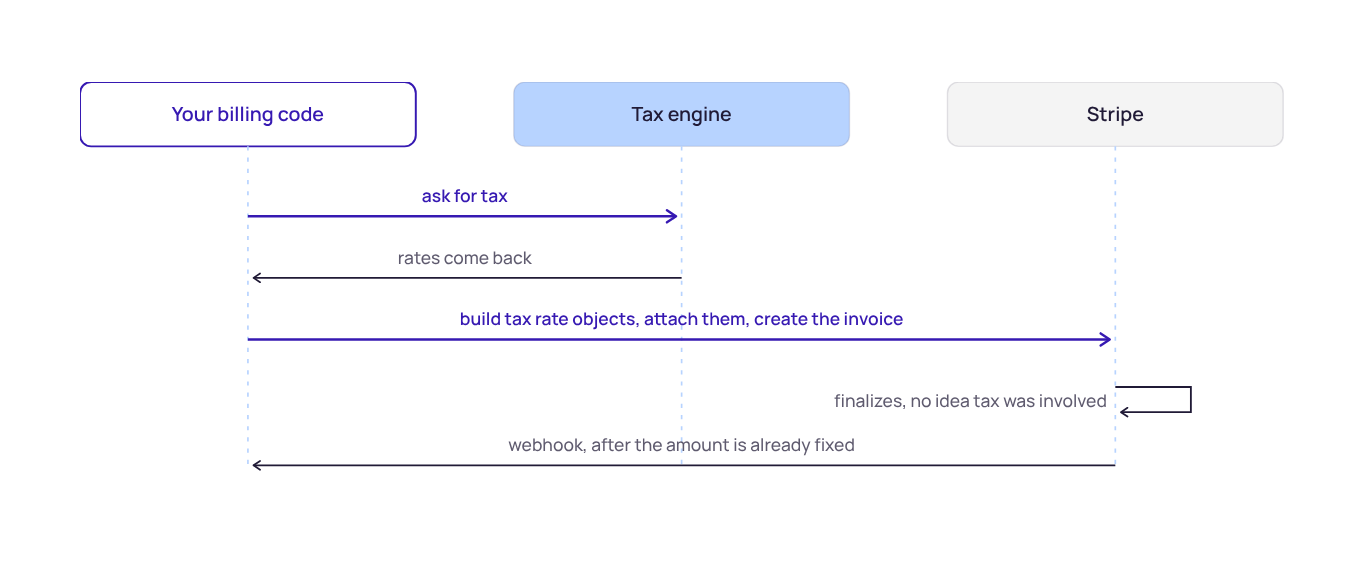
Moving to one system fixes the disagreement problem. Then a second one shows up. If your third-party tax provider isn't integrated with Stripe, Stripe won't call it. Your own billing code has to ask for tax, get it back, and put it on the object before Stripe creates it.
In a customer-built integration, Checkout shows the problem best. Tax depends on the customer's address, but a hosted checkout page collects that address inside the session, after the session already exists with its line items. So you move address collection up into your own UI, calculate tax first, and pass it in.
And you have a lot of surfaces to cover:
- Checkout
- Subscriptions
- Invoices
- Quotes
- Portal
- Payment Links
- Elements
- Stripe API
When it breaks, nothing tells you
Miss the tax call in one branch, for one region or one charge type, and there's no error. The invoice finalizes, the customer pays, and the record shows no tax. You find out weeks later in a discrepancy report, for tax you've already agreed to remit and can't go back and collect.
The usual culprit is one surface where the call got skipped, and nobody noticed for a billing cycle or two.
Some Stripe features are hard to cover with a customer-built integration
A customer-built integration can't reach surfaces where there's no code between the customer and the charge, such as Checkout, Payment Links, and the Customer Portal. Stripe's own products don't require a third-party provider, and Checkout also supports Stripe Tax. Proration on upgrades and downgrades and subscription previews are also hard to cover this way, because Stripe computes an amount that doesn't exist yet. Over time your tax integration starts deciding what your billing roadmap can do.
It never finishes
Call it four weeks for a solid first pass. Teams tend to argue about that number. The ongoing cost matters more. Every surface gets re-verified whenever billing changes, and every new surface is a new build. It's a standing item in the backlog for a team whose job isn't tax.
Setup three: Anrok's Stripe integration, where Stripe does the calling
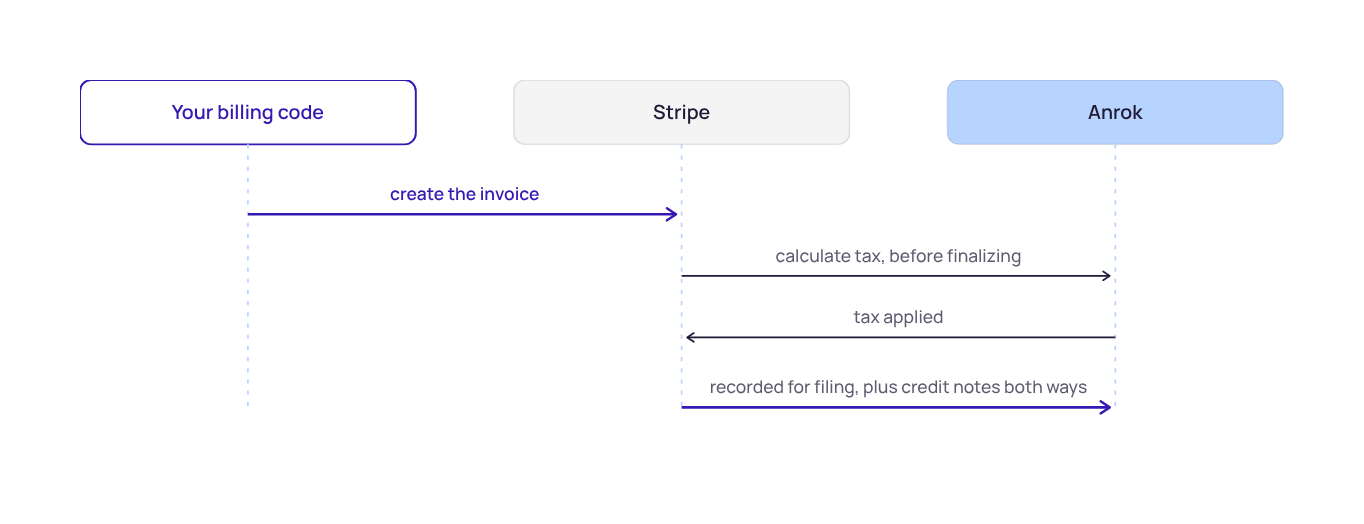
Anrok is a third-party tax app from the Stripe App Marketplace. You register it as your tax provider in Stripe. From then on Stripe calls us directly, as a normal step in its own billing flow, right before it finalizes. Your code is out of the tax conversation entirely.
Less coverage to manage
Stripe makes the call, so every eligible billing object gets the same treatment. Anrok supports a range of eligible Stripe Billing surfaces, including Checkout, Payment Links, the Customer Portal, invoices, subscriptions, quotes, and dashboard-created invoices. See Stripe's third-party tax app support matrix. The integration can reduce the amount of customer-maintained code required as Stripe and Anrok add support for new, eligible features. On supported surfaces, nobody can forget the tax call in a branch, because there isn't one in your code to forget.
Setup is two settings, plus a flag or two
- Set Anrok as your automatic tax provider in Stripe.
- Turn automatic tax on with
automatic_tax[enabled]=true. Checkout Sessions and Payment Links also wantinvoice_creation[enabled]=true, and Checkout outside the US wantstax_id_collection[enabled]=true.
You don't have to turn it on everywhere
Stripe charges per transaction for automatic tax, so plenty of teams use it where invoices finalize right away or Stripe hosts the page, and let our asynchronous engine handle the batch runs that sit in draft. Same vendor either way, one place to configure it, and you only pay the fee where it earns something.
And the refund from setup one now happens on its own
One system calculates and files, so there's one address resolution, one jurisdiction lookup, and one place to configure products and registrations, which leaves nothing to disagree about. The same platform handles reconciliation too, which no other tax engine has built in.
Because Anrok is integrated with Stripe instead of downstream of it, corrections run backwards too. A late certificate reverses the filed transaction, restates it as exempt, and issues a tax-only credit note in Stripe. Your customer gets their money back and nobody goes hunting for the transaction.
Where to start
If you're on two vendors, the fastest thing to check is what happens today when a certificate arrives after you've filed. Who issues the credit, and how long does it take? That answer usually says more about the setup than any feature list.
If you're weighing a build against automatic tax, the build is the easy part. Owning it across every Stripe surface, every time billing changes, is the part worth pricing.
Want to see it on your own Stripe account?
We'll install in read-only mode, import your invoices, and show you what we'd have calculated and filed. Nothing gets written to an invoice until you say so, jurisdiction by jurisdiction, on your dates.